Discover
Discover the TotalFolder user interface
The user interface helps teams and professionals discover emails and documents more easily, when handling large volumes of data.
It reduce wasted time and keeps important information within reach.
Below, discover a smarter way to search, organize, and work with your emails and files.
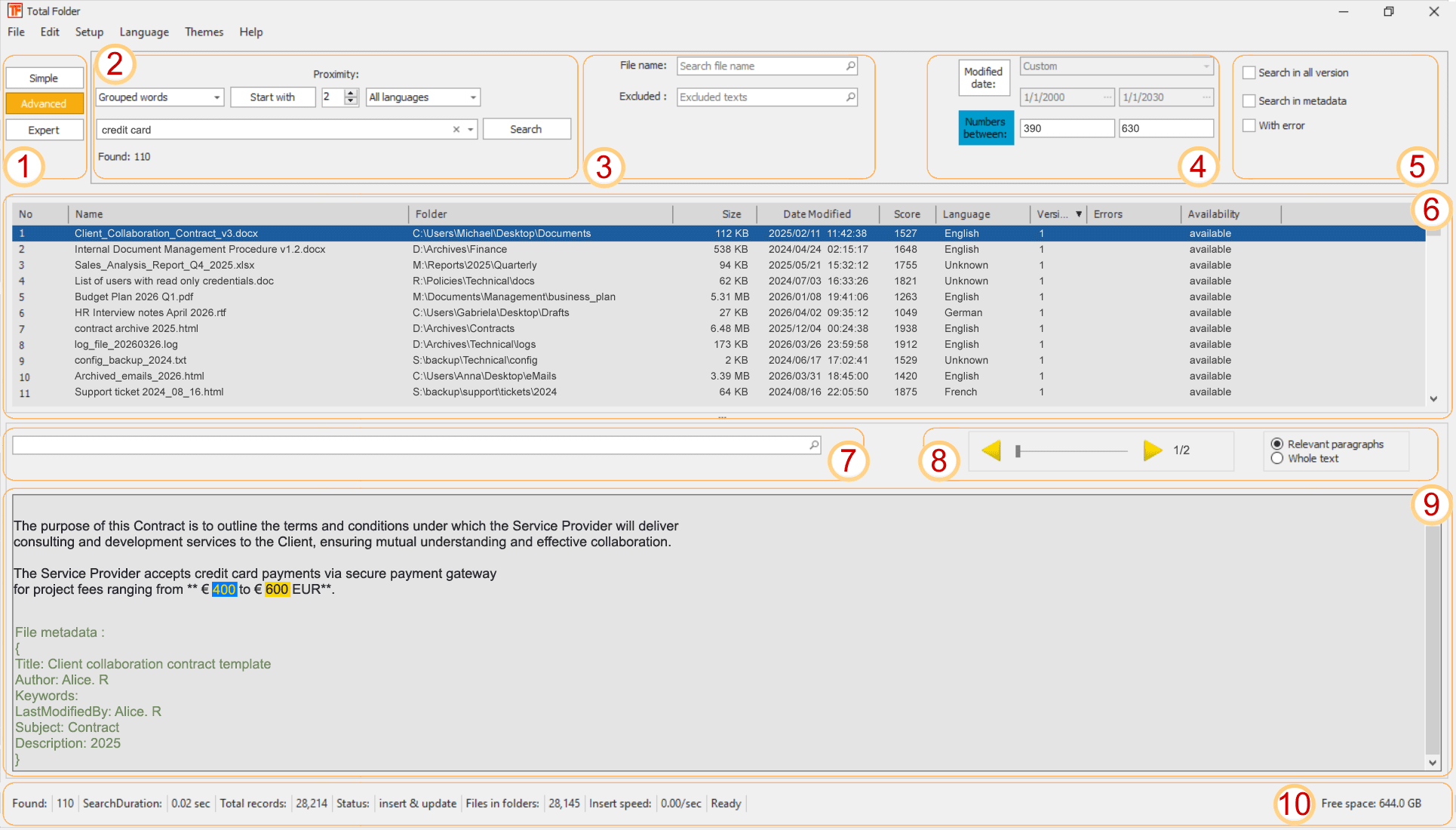
Switch between Simple, Advanced, and Expert modes to match the level of search precision you need. This panel gives users quick access to progressively more powerful search and filtering options.
Define the core search criteria in this area, including the search type, matching behavior, proximity settings, language and the primary keyword or phrase. This is the main workspace for building structured, high-accuracy search queries.
Narrow down results by specifying file name criteria or excluding unwanted terms and text patterns. This section helps refine large result sets and improves relevance by removing known noise from the search.
Limit results using document dates and numeric ranges found in content or indexed values. This is especially useful when searching for emails and files related to specific periods, amounts, codes, or measurable data.
Enable additional search behaviors such as searching across all versions, search into metadata, or returning items with processing errors. These options provide deeper control for advanced investigations and audit-style searches.
Review matching documents in a structured list that displays key file details such as name, folder, size, modified date, relevance score, language, version, and availability. This grid is designed for fast scanning, sorting, and selecting the most relevant result.
Search within the currently selected document preview to quickly locate specific words or expressions inside the displayed content. This makes it easier to jump directly to relevant passages after opening a result.
Move through detected matches or relevant text fragments using the navigation arrows and position indicator. This area allow step-by-step review of highlighted occurrences within the selected document.
View extracted document content, highlighted matches, and visible metadata in a single reading area. This panel helps users validate search results instantly without opening the original file in a separate application.
Monitor live search and indexing information such as the number of matches found, search duration, total indexed records, processing status, insert speed, and available disk space. This section provides immediate operational feedback and system context.